
Transform your phone into the perfect mirror. Convenient! Tap the mirror area to show or hide the menu.
Please watch the tutorial video to learn how to use it.
[ Tomorrow, I will meet ... me ... from yesterday. ]
Mirror + Selfie Camera (the best free mirror app)
Turn your phone into an ideal smart mirror.
Handy!
Tap the mirror area to show or hide the menu.
[Quick Mirror Camera Guide]
When the app starts, all menus are hidden for a realistic mirror experience.
You can adjust settings using these methods:
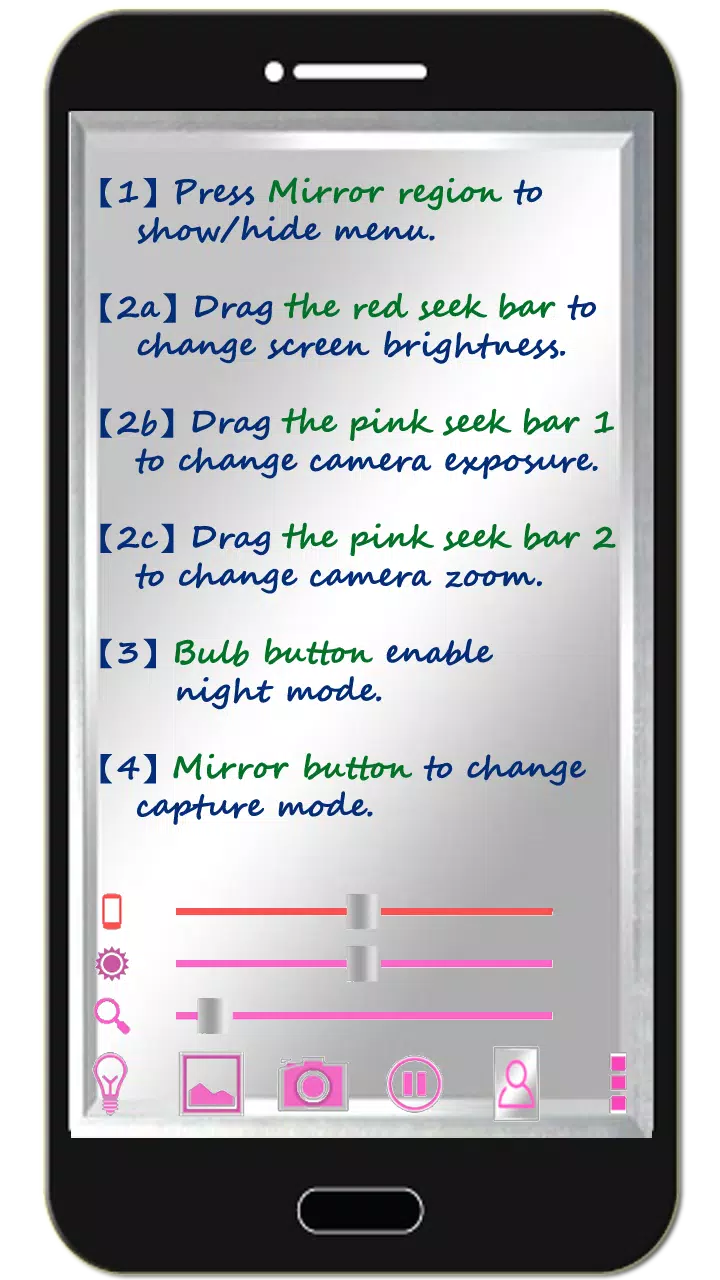
1. Tap the mirror area to show or hide the menu.
2. Drag the red seek bar to adjust screen brightness.
3. Drag the first pink seek bar to change camera exposure.
4. Drag the second pink seek bar to zoom the mirror in or out.
5. Press the bulb button to enable or disable night mode.
6. Press the mirror button to switch capture modes (Image on Mirror or Real Image).
7. Press the pause/resume button to freeze or resume the preview. Double-tap the frozen image to zoom, or use two fingers to zoom in and out.
8. [Volume Key] : Use the volume-down key to pause or resume the preview (freeze image). Use the volume-up key to capture a photo. Additional options are available in the camera settings.
[Additional Features]
1. You can also take pictures or edit mirror photos as desired.
2. Night mode : Press the bulb button to activate edge panel lighting.
3. The app keeps the screen on during use. It automatically exits after 10 minutes of inactivity to save power.
【Recommended External Mirror Photo Editor】
( Line Camera )
https://play.google.com/store/apps/details?id=jp.naver.linecamera.android
This app has been tested for better compatibility and offers user-friendly external photo editing.
Alternatively, the system photo editor also works (tested on Samsung devices).
【Note】
Please like us on Facebook. Your support means a lot.
https://www.facebook.com/jkfantasy
What's New in the Latest Version 1.6.0
Last updated on May 26, 2020
V1.6.0:

1. Minor bugs fixed.
Зеркало + камера селфи [ Mirr
- Категория : Мода красоты
- Версия : 1.6.0
- Размер : 2.8 MB
- Разработчик : JK.Fantasy
- Обновлять : Apr 25,2026


-
Сумнерс Вар: Чемпионат 2025 и 11-летие торжества

Событие Summoners War World Arena Championship состоится в этом годуОно будет проходить в Бразилии, Корее и Франции, регистрация откроется в июнеТакже скоро стартует событие 11-й годовщины, которое включает премиальные награды и специальные миссииПок
by Harper Apr 21,2026
-
As of 2025, Saga—the critically acclaimed sci-fi/fantasy comic series created by Brian K. Vaughan and Fiona Staples—remains one of the most popular and widely read comics in the world. Thanks to its rich storytelling, intricate world-building, and stunning artwork, fans continue to seek out official and authorized digital platforms to read Saga online.
Here are the best sites to read Saga comics online legally and safely in 2025:
✅ 1. Marvel Unlimited (via Marvel.com)
Why it’s great: Saga is published by Image Comics, not Marvel, so it's not available on Marvel Unlimited.
⚠️ Important Note: This is a common misconception. Saga is not on Marvel Unlimited.
✅ 2. Comixology (Amazon) – The #1 Official Source
Website: https://www.comixology.com
Why it’s the best:
Full digital access to all 100+ issues of Saga (including collected editions and trade paperbacks).
High-quality digital scans with original coloring and page layouts.
New issues release weekly, often same-day as print.
Cross-device syncing via app (iOS, Android, Kindle, web).
Comixology Unlimited subscription offers unlimited access to thousands of comics (including Saga) for a monthly fee (~$9.99).
Best for: Fans who want the most reliable, up-to-date, and immersive digital experience.
✅ 3. Image Comics Official Website (Free & Paid)
Website: https://www.imagecomics.com
Why it’s useful:
Offers free digital previews of new Saga issues.
You can purchase and download individual issues or collections.
Direct support for creators (Brian K. Vaughan and Fiona Staples).
Best for: Fans who want to support the creators directly and get official releases.
✅ 4. Apple Books (iOS/Mac)
Website: https://books.apple.com
Why it’s good:
Full Saga series available as eBooks (individual issues and collected editions).
Seamless integration with Apple devices (iPhone, iPad, Mac).
High-resolution artwork and easy-to-read format.
Great for readers who prefer the eBook experience over app-based comic readers.
Best for: Apple ecosystem users.
✅ 5. Kindle (Amazon) – Digital Comics & Collections
Website: https://www.amazon.com
Why it’s useful:
Saga collected editions (e.g., Saga: Volume 1, Volume 2, etc.) are available as Kindle books.
Read on Kindle devices, Fire tablets, or Kindle app.
Great for offline reading and long-term storage.
Note: Individual issues may not be sold separately here—collections are best for full story immersion.
❌ Sites to Avoid (Unofficial or Pirated)
Reddit forums, Telegram groups, or "free comic" sites like "ComicZen," "ReadComicsOnline," or "ReadSagasNow" often:
Upload content without permission.
Contain malware, pop-ups, or poor-quality scans.
Risk legal action or account bans.
Always choose legal platforms to support creators and ensure a safe, high-quality experience.
🔑 Pro Tips for 2025 Readers:
Subscribe to Comixology Unlimited if you're a fan of Saga and other comics—great value.
Set up a library using Comixology or Apple Books to track your progress.
Follow Image Comics and Brian K. Vaughan on social media for announcements on new arcs, spin-offs (like Saga: The Unwritten), and exclusive content.
Final Verdict (2025):
✅ Best Site to Read Saga Online: Comixology (Amazon)
It’s the most reliable, up-to-date, and feature-rich platform for reading Saga digitally—perfect for new and long-time fans alike.
📘 Bonus: Don’t miss Saga: The Complete Series (hardcover/softcover) and the Saga: The Art of the Series book, which includes behind-the-scenes sketches, concept art, and interviews.
Support the creators and enjoy Saga the way it was meant to be read—on the official platforms, with full respect to the art and story.
Happy reading! 🌌🚀🌌
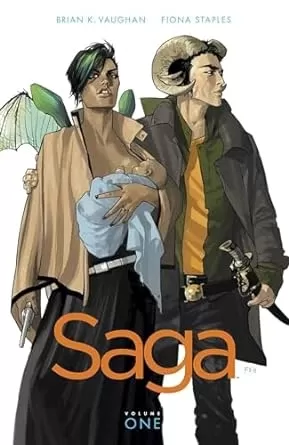
Пока серия Брайана К. Ванга и Фионы Стаплес не совсем завершена — Ванга предположил, что она будет продолжаться 108 выпусков, — но уже сейчас, когда вышло 72-й номер, идеальное время начать читать «Saga». Начать цифровое чтение — отличный способ, и у
by Thomas Apr 21,2026




-
Лучшие повседневные игры для игры сейчас

Всего 10 03-05
-
Реалистичные гоночные симуляционные игры для Android

Всего 10 06-14
-
 Sofascore - Результаты Онлайн Спорт丨33.22 MB1
 -

-

-

-
 Descended from Odin Связь丨13.07M5
 -


- Marvel конкуренты составляют оптимизацию шейдеров
- Blox Fruits: обновление Дракона выпущено
- Assassin's Creed Shadows раскрывает режим Canon
- Game Squid Game развязан: руководство для начинающих
- Zenless Zone Zero добавляет Astra Yao в обновлении 1.4 «Режим ТВ»
- «Новая jrpg 'Digimon Story: Time Stranger» объявила »
- Monster Hunter Wilds переопределяет серию благодаря игровому процессу с открытым миром
- Бесконечность Никки: Как ездить на поезде Чу Чу
- Теннис становится ретро с новой игрой: Retro Slam